GDPR Compliance for Solo Founders: 2026 Must-Know Checklist
Posted on August 22 2026 by Telemore TeamWhat Changes When It’s Just You
You have zero employees and one nightmare: Article 32 of the GDPR. The regulation demands “appropriate technical and organizational measures” to secure personal data. For a solo founder, that phrase is a legal landmine—vague enough to trip over, specific enough to get fined. This isn’t about hiring a lawyer. You can’t afford one.
It’s about building automated compliance into your stack before a DPA audit reveals what you don’t have. Start with your data map. Document exactly where EU user emails, IP addresses, and session logs live: Postgres tables, Redis caches, or S3 buckets. Tools like Telemore’s continuous monitoring can generate this mapping on autopilot. Then enforce privacy by design.
Encrypt at rest (AES-256) and in transit (TLS 1.3). Automate Data Subject Access Requests so you respond within the 30-day window without waking up at 3 AM to grep through server logs. Your vendor risk assessment matters more than your own code base. Every third-party service handling EU data becomes your liability under Article 28. Slack, Stripe, Vercel all demand written DPA agreements.
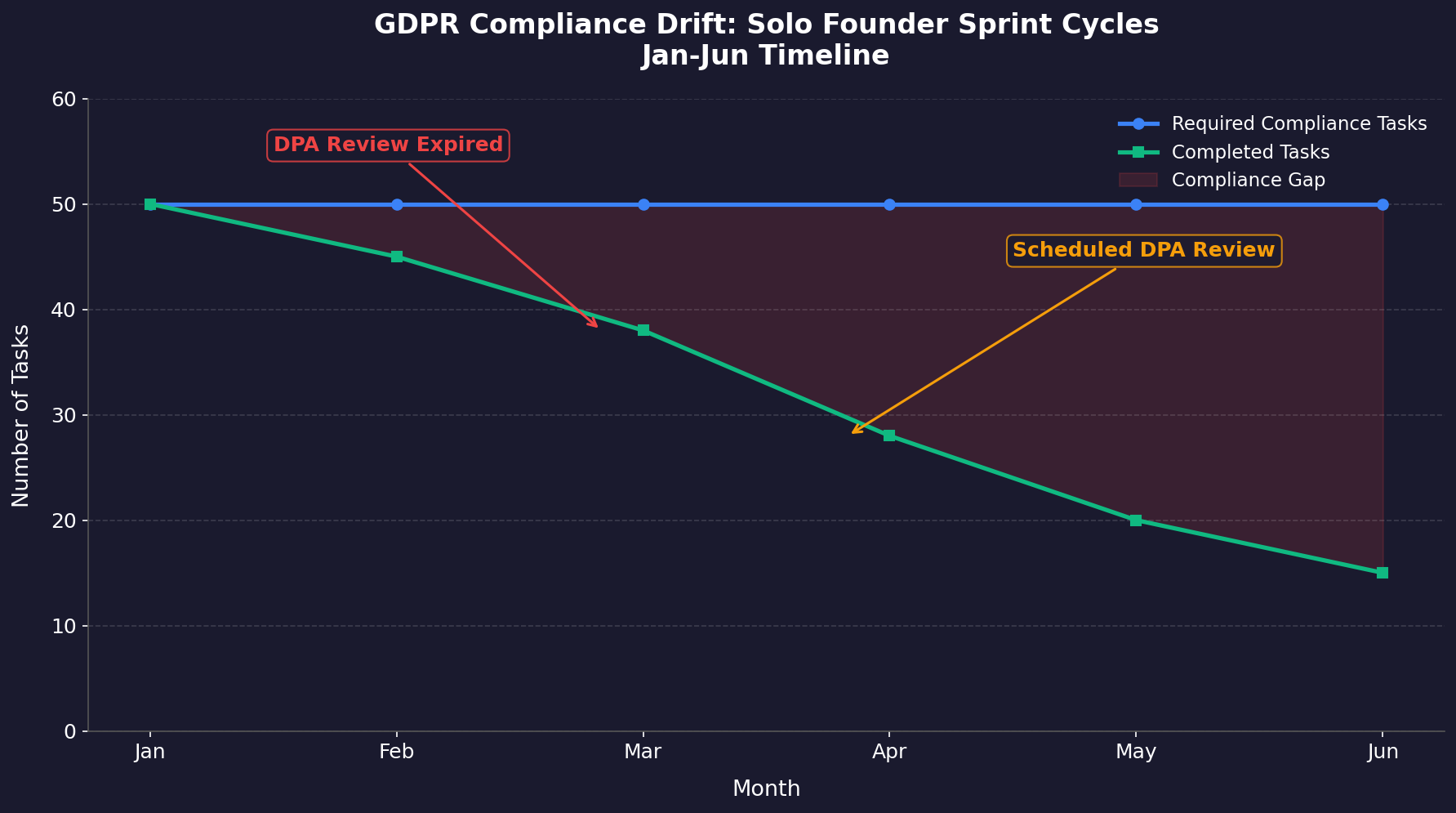
These aren’t optional tasks—they’re control requirements under Article 32 of the GDPR. But a one-person team doesn’t have eight hours for compliance overhead. Every hour spent on manual evidence collection is an hour stolen from product development or customer support. The real problem is frequency drift. A checklist from January gets abandoned by March because the founder’s sprint cycle left no room for its maintenance intervals.
By June, the DPO might not exist, but nobody caught it because the DPA review was scheduled for week seventeen and nobody noticed it expired in week eleven. This is where standard templates collapse entirely. They assume organizational capacity that simply doesn’t exist when the entire engineering, legal, and operations functions converge on one human being.
Static checklists work for teams with dedicated compliance personnel rotating through tasks weekly. For solo operators, they create a false sense of security—the document exists, but nobody verified its accuracy since installation day. The gap isn’t intention; it’s bandwidth. And bandwidth can’t be templated away.
Know Where Your Data Lives
Bandwidth is the symptom. Geography is the root cause. GDPR cares where data sits, not how fast you can fix a bug. A German Data Protection Authority fine of €20 million hit H&M in 2026 for unlawfully storing employee records on a local network drive, not a cloud provider. The size didn’t matter.
Your laptop is a data center. That Slack message from a French user is personal data the moment it leaves their keyboard. Article 3 of GDPR extends territorial scope to any processing that involves EU residents. Your Shopify store doesn’t need an EU office to trigger obligations. So map every byte path today.
Not next sprint, not after launch. Document your stack: Stripe for payments (US servers), Google Workspace for email (US servers), Notion for product docs (US servers). Each vendor is a processor requiring Article 28 Data Processing Agreements. Without them, any breach puts you at €10 million or 2% of global turnover. No team means no one second-guesses your setup errors. Automate the mapping instead. Telemore’s continuous discovery scans every SaaS connection and flags cross-border transfers automatically during nightly runs.
No manual spreadsheet rot. Data maps prevent existential surprises at scale zero.
#
The Hidden Data You Forgot You Had
Most solo founders map their obvious data stores—the production database, the email provider, the payment processor. They forget the long tail. Your customer support tool’s cached attachments. The CSV export you downloaded to analyze churn and never deleted. The error-tracking service that logs full stack traces including user IDs and query parameters. The analytics dashboard that stores raw event payloads with email addresses because you didn’t configure property redaction.
Each of these is a separate processing activity under Article 30. Each requires documentation. Each carries its own retention window. A support ticket from a French customer contains their name, email, and possibly payment details in a screenshot they attached. That screenshot lives in your helpdesk’s S3 bucket indefinitely unless you set an automated purge. The GDPR doesn’t care that you forgot it existed. The regulation cares that it exists, unaccounted for, in your infrastructure.
Walk through a typical week as a solo founder. Monday: you export user emails from Postgres to Mailchimp for a product update. Tuesday: you pull session recordings from Hotjar to debug a UX issue. Wednesday: you upload a customer’s error log to Pastebin to ask for help in a Discord server. Thursday: you sync your Notion docs to a personal Google Drive for backup. Friday: you download a Stripe payout report to reconcile your books.
Six separate data transfers. Six potential compliance gaps. Six places where EU personal data leaves your controlled environment without a documented lawful basis or a DPA in place. The continuous discovery tool catches these because it monitors every outbound API call and flags any new destination that hasn’t been registered in your data map.
Selecting Your Processing Basis
The legal foundation for every data operation must be documented before processing begins. Consent is rarely the correct choice for SaaS founders. Article 6 of the GDPR lists six lawful bases. Most solo-run services should lean on “legitimate interests” or “contractual necessity.” Legitimate interests covers analytics, fraud prevention, and product improvement, but requires a balancing test documented in your records. Stripe charges $0.30 + 2.9% per transaction. That payment flow needs no consent; contractual necessity covers it completely.
Consent demands affirmative opt-in with equal ease of withdrawal. Checkboxes must remain unchecked by default. Users can revoke consent anytime, forcing you to stop processing their data immediately—a problem if that data powers core functionality. Document which basis applies to each purpose in your Article 30 record. Without this mapping, your compliance rests on guesswork enforcement inspectors will quickly expose as insufficient preparation during audit proceedings.
#
The Balancing Test Nobody Tells You About
Legitimate interests sounds like a catch-all, but it requires a documented balancing test. You must weigh your interest in processing against the user’s fundamental rights and freedoms. The test has three steps. First, identify the legitimate interest—fraud prevention, security monitoring, product improvement. Second, assess the impact on the data subject—would a reasonable person expect their data to be used this way? Third, apply proportionality—is there a less intrusive way to achieve the same goal?
Concrete example: you want to track which features users click to prioritize your roadmap. Your legitimate interest is product improvement. The impact on users is low—you’re tracking anonymous interaction events, not personal communications. The proportionality check passes because you’re not collecting more data than necessary. Document this reasoning in your Article 30 record. Write it as a paragraph, not bullet points. Regulators want to see genuine consideration, not template language.
But here’s where solo founders trip: legitimate interests requires offering an opt-out mechanism. You can’t just bury it in your privacy policy. Users must be able to object to the processing, and you must stop unless you can demonstrate compelling legitimate grounds that override their interests. That means your analytics script needs a way to respect a do_not_track flag or a consent cookie. If you’re using a third-party analytics tool that doesn’t support this, you’re non-compliant from day one.
Building Your Data Processing Register
That Article 30 record demands more than intent declarations. It requires hard evidence: timestamps, system logs, and configuration snapshots that prove your processing activities match your documentation. Most solo founders fall into the “document-then-deploy” trap. They map flows once during build time, then iterate rapidly without updating records. A Friday night hotfix can silently introduce new data categories or retention periods, creating an invisible compliance gap. The platform’s continuous scanning catches this drift automatically.
Every deploy triggers a fresh asset inventory comparison against your registered data flows. Mismatches generate alerts before regulators ever see them. Your register must capture four concrete elements per processing activity: the specific personal data fields involved, the lawful basis from Article 6, the storage location (including any CDN caches), and the retention window in calendar days.
#
Retention Windows: Pick Numbers, Not Vibes
Retention windows are where solo founders get lazy. They write “as long as necessary” and call it done. They want specific numbers. Here’s a practical framework. User account data: delete 30 days after account closure, unless legal obligations require longer. Payment records: retain for 7 years to satisfy tax requirements—this overrides GDPR deletion requests under Article 17(3)(e). Support tickets: purge after 12 months, or immediately after resolution if they contain sensitive data.
Analytics events: aggregate after 90 days, delete raw events after 180 days. Error logs: strip user identifiers after 72 hours, delete after 30 days.
Set these as automated jobs in your infrastructure. A cron job that runs nightly and deletes expired records. A database trigger that anonymizes user emails after the retention period lapses. A scheduled Lambda function that empties your error-tracking service’s old logs. If you rely on manual deletion, you will forget. The automation tool’s evidence collection captures these scheduled jobs as proof of compliance, showing regulators that your retention windows aren’t just documented—they’re enforced.
Mapping Data Flows When You Are Both Engineer & Controller
Distinguish strictly necessary cookies from marketing pixels embedded accidentally inside open-source libraries pulled late Friday afternoon while debugging a production outage. Strictly necessary cookies require no consent under Article 5(3) of the ePrivacy Directive. They enable core functionality: session tokens, load balancer stickiness, CSRF protection. Everything else demands explicit opt-in before firing a single byte. The problem compounds when you import an npm package like react-share or a CDN-based font loader.
One unread node_modules/README.md and suddenly your GDPR cookie banner covers 17 tracking domains you never intentionally deployed.
Run npm ls --depth=0 | grep -i "track\|analytics\|pixel" to audit your dependency tree right now. The compliance tool’s scanner detects third-party scripts embedded four layers deep in your JavaScript bundle. Create two clear categories in your privacy notice. Group A: authentication tokens and rate-limit counters (no consent required). Group B: everything else with a toggle set to off by default.
Document every library’s network calls using Chrome DevTools’ Network tab filtered to “script” and “xhr”. Record the domain, purpose, data transmitted, and retention period in a spreadsheet linked to your GDPR Article 30 register. Your cookie banner must block Group B scripts pre-consent using JavaScript’s document.createElement replacement pattern. Don’t trust lazy-load attributes or async directives—scripts execute before either fires reliably across browsers.
#
The npm Dependency Trap
Let me walk you through a real scenario. You’re building a landing page. You want social share buttons, so you install react-share. It pulls in facebook-sdk, twitter-widgets, and linkedin-insight-tag as dependencies. You didn’t read the package.json. You didn’t check the network calls. You just wanted a share button. Now your site fires Facebook’s tracking pixel, Twitter’s widget script, and LinkedIn’s conversion tracker on every page load—before the user has consented to anything.
That’s a violation of ePrivacy Directive Article 5(3) and GDPR Article 7. The fix isn’t just removing the package. It’s auditing every dependency in your tree. Run npm audit --json to see the full dependency graph. Check each package’s package.json for browser fields that reference external domains. Use curl to fetch the minified bundle and grep for http URLs. You’ll be surprised how many third-party calls hide inside “innocent” utilities.
The same applies to fonts. Google Fonts loads from fonts.googleapis.com and fonts.gstatic.com. Each request sends the user’s IP address to Google’s servers. That’s a data transfer to a US processor without a DPA. Self-host your fonts instead. Download the woff2 files, serve them from your own CDN, and eliminate the tracking vector entirely. The performance gain is negligible, but the compliance win is significant.
The Cost of Ignoring GDPR
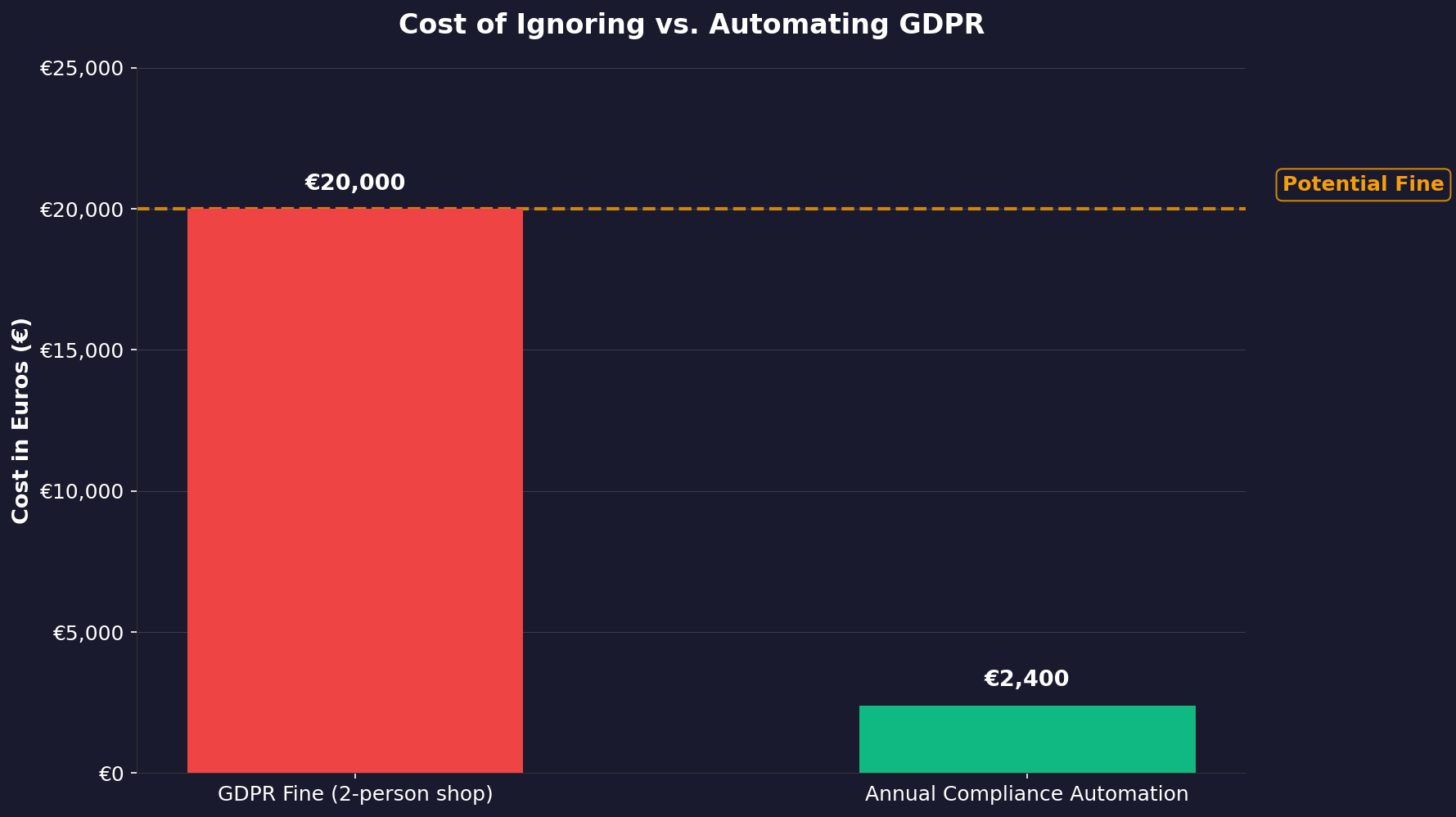
Germany’s BfDI fined a two-person e-commerce shop 20,000 euros for failing to respond to a deletion request within the mandated window. The founder thought nobody would notice their privacy@ email address bounced. Automation changes this calculus. The platform monitors consent compliance across your stack and alerts you before deadlines lapse. A single DPA complaint triggers an investigation regardless of company size.
Solo founders carry personal liability exposure under the GDPR. The regulation doesn’t scale down its penalties for headcount. Fines reach €20 million or 4% of global revenue. You are the entire org chart—a solo operator processing customer data in Notion, Gmail, and Stripe faces the same regulatory burden as a 200-person company. Standard checklists prescribe roles you don’t have: a DPO, a data protection team, a legal counsel.
Every hour spent on compliance documentation is an hour not building product or talking to users.
Your data map is only as good as its last update. Your DPA library is only safe if it covers every subprocessor you onboard next quarter. And your 72-hour breach window closes fast when logs are scattered across five cloud services. The compliance tool keeps those logs stitched together and your evidence collection running 24/7.
One dashboard for vendor risk scores, encrypted consent records, and automated DSAR responses. No midnight grep sessions required. The question isn’t whether you can afford compliance automation in 2026. It’s whether you can afford the alternative: a DPA audit that finds gaps a lawyer costs thousands to patch after the fact. Start before they knock.
#
The 72-Hour Breach Window, Broken Down
Article 33 requires you to notify your supervisory authority within 72 hours of becoming aware of a personal data breach. For a solo founder, “becoming aware” is a terrifying phrase. It means the moment you see the alert, the clock starts. Not when you confirm the breach. Not when you assess the scope. The moment you know.
Let’s say you wake up to a notification from your hosting provider: “Unauthorized access detected on your database cluster.” That’s hour zero. You have three days to file a report with the DPA. The report must include the nature of the breach, the categories and approximate number of data subjects affected, the likely consequences, and the measures you’ve taken to mitigate. If you don’t have logs centralized, you’ll spend 48 hours just figuring out what data was exposed.
Keep Reading
- How Whitepapers Are Reshaping AI Governance Frameworks—Regulator Expectations
- The Hidden Cost of SOC 2 Compliance: Solving Your Top Audit Pain Points
- Beyond Surveillance: Employee Data Privacy Compliance With AI Systems
The automation tool’s continuous monitoring means you get the alert the moment anomalous access patterns appear—not when your hosting provider gets around to notifying you. It also generates a draft breach report with your data map, affected categories, and mitigation steps pre-filled. You review, sign, and submit. Total time: under two hours. That’s the difference between a compliant response and a regulatory nightmare.
Work smarter with AI
Telemore helps you focus on what matters. AI-powered productivity that adapts to how you work.
Try Telemore Free